
Who's on it? Assignment in a shared inbox
On this page
In AcornReply, everyone on your team sees every conversation. Assignment is how you keep from tripping over each other — it marks who's currently on a thread, without ever limiting who can see it.
One owner, or none
Each conversation is either assigned to a single teammate or left unassigned (shown by a dashed circle on the row). Assignment is about responsibility, not access: an assigned conversation is still fully visible and open to everyone.
It mostly happens automatically
You rarely need to assign by hand, because AcornReply keeps ownership sensible on its own:
- Replying claims it. The moment you send a reply, an unassigned conversation becomes yours.
- Returning customers stick with their person. When a customer you've helped before writes in again, the conversation is handed to whoever last replied to them — so the same teammate keeps the relationship.
Assigning by hand
When you do want to move a thread, tap the assignee chip — on the conversation row or in the conversation header — to open the picker:
- Assign to me — take it.
- Any teammate — hand it off.
- Unassign — put it back in the shared pool.
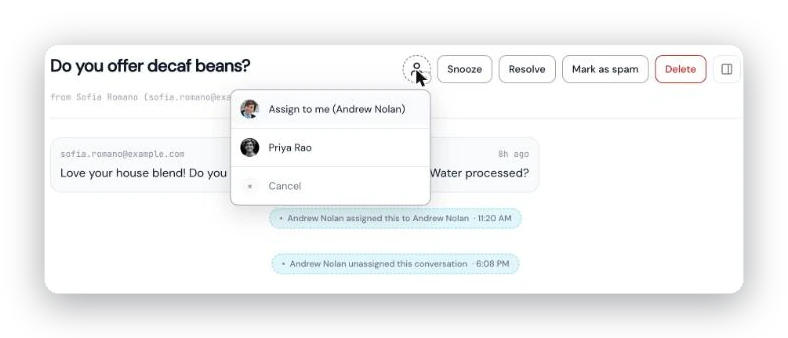
Tap the assignee chip to open the picker: take it yourself, hand it to a teammate, or unassign it.
Seeing just your work
The Mine filter at the top of the inbox narrows the list to conversations assigned to you, so you can focus on your own plate without losing the shared view.
Assignment and notifications
Ownership decides who gets pinged. An assigned conversation only notifies its assignee; an unassigned one notifies everyone who subscribed to new-message alerts — until someone replies or picks it up, at which point future messages go just to that person. Snoozing an unassigned conversation quietly assigns it to you, so its wake-up has somewhere to land. See Notifications: never miss a message for the full picture.