
Setting your availability and hours
On this page
Your availability tells AcornReply when you're around to help. It's a personal setting — one per teammate — and it does two useful jobs: it can show customers whether your team is online in live chat, and it lets the AI cover for you when nobody's available. Set it under Settings → Availability.
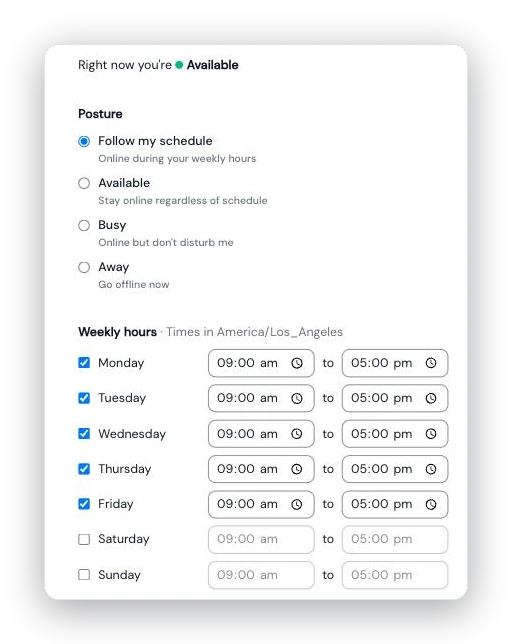
The Availability page: pick a posture, then set the weekly hours you're online.
Choose your posture
Pick how your status is decided:
- Follow my schedule — you're online during the weekly hours you set (below), and away outside them.
- Stay online regardless of schedule — always shown as available.
- Online but don't disturb me — you're working, but signalling you'd rather not be pulled in.
- Go offline now — away immediately.
A live indicator shows whether, right now, you count as available or away.
Set your weekly hours
If you're following your schedule, turn on the days you work and set a start and end time for each (a newly enabled day defaults to 9:00–17:00). Times are shown in your profile's timezone — so if that looks off, update your timezone in your profile.
Going on vacation
Heading out? Flip on the vacation toggle and set the dates. You'll show as away for that period — even if your schedule says otherwise — and your normal schedule resumes automatically when it ends. You can set this ahead of time.
What your availability controls
- Auto-reply coverage. If your workspace uses the "Auto-reply — only when no agent is available" mode, AcornReply checks your team's availability: while anyone is available, incoming messages are drafted for a human; when everyone's away, the AI steps in and replies. See Let the AI reply on its own: auto-reply and AI assist modes.
- Live chat presence. Your status can show as online/away in the live-chat widget — but only if your workspace has turned on the status indicator (under Settings → Channels → Live chat). Otherwise your availability stays private and just affects auto-reply coverage.
Because availability is per person, your team's overall coverage is simply the combination of everyone's individual status.