
Let the AI reply on its own: auto-reply and AI assist modes
On this page
By default, AcornReply drafts a reply and you send it. But when you're ready to hand off more, the AI can suggest help articles, or reply and resolve conversations entirely on its own. You choose how far it goes under Settings → AI assist (admins only). It's set to Off by default, so nothing changes until you decide it should.
The four modes
| Mode | What the AI does |
|---|---|
| Off (default) | Drafts replies for a teammate to review and send. Never sends or deflects on its own. |
| Show help articles | Suggests relevant help articles to the customer before they submit a request, so they can often answer their own question. |
| Auto-reply — always | Replies to and resolves conversations automatically, around the clock. |
| Auto-reply — only when no agent is available | Steps in only when your whole team is away or outside scheduled hours. When someone's available, it behaves like Off and drafts for a human. |
Pick one, click Save changes, and it applies to new incoming messages across email, your contact form, and chat.
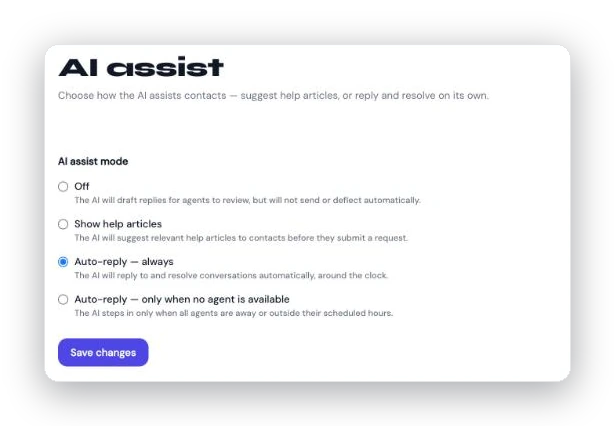
Settings → AI assist: choose how far the AI goes, from draft-only to full auto-reply.
How auto-reply works
When auto-reply is active, the AI reads the customer's message, searches your published knowledge base, and composes a grounded answer — then:
- If it has a confident answer, it sends the reply and marks the conversation resolved (through the same resolve flow a human uses, so you can always reopen it).
- If it needs more detail, it sends a short clarifying question and keeps the conversation open, waiting for the customer.
Every AI-sent message is marked with an AI badge in the thread, so it's always clear who replied.
It always knows when to step back
Auto-reply is built to fail toward a person, never past one. The AI stops and hands the conversation to your team whenever:
- The customer explicitly asks for a human ("talk to a real person," "no bots") — checked before the AI ever replies.
- The AI judges the customer wants a person, or it can't find a grounded answer.
- The conversation has gone three AI turns without resolving — a hard cap on back-and-forth.
- A teammate has already replied, the conversation is assigned, or your plan's AI reply quota is used up.
- Anything goes wrong internally — an outage or error always routes to a human rather than dropping the message.
And once a human is pulled in, the AI stays out of that conversation from then on. It also never sends the same reply twice, even if a job retries.
"Only when no agent is available"
This mode is tied to Settings → Availability. AcornReply checks your team's posture and scheduled hours: if anyone is available, incoming messages are drafted for a human just like Off; if everyone's away, the AI takes over so customers aren't left waiting after hours. See Setting your availability and hours.
What it does to your numbers
Your choice here shows up directly in Analytics:
- Conversations the AI replies to and resolves count as AI resolved.
- Customers who get their answer from a suggested article count as self-served.
- Anything handed off counts as needed a human.
If AI assist is Off, the analytics dashboard shows a reminder banner, since the AI isn't contributing to those outcomes. See AI resolved, self-served, needs a human: how conversations are counted.
A good way to start
Most teams don't flip straight to full autonomy. A common path: keep the default (Off) while you build up your knowledge base, then try Show help articles or only when no agent is available first — and move to always once you trust the results. You can change modes any time.
Related: How AcornReply drafts replies covers the human-in-the-loop default that underpins every mode.