
Organizations and workspaces: running one inbox or many
On this page
AcornReply has two levels of structure: the organization and the workspace. Most teams only ever think about one workspace — but understanding both makes it clear how billing, teammates, and multiple brands fit together.
The two levels
- An organization is your company's account. It owns billing and membership, and there's usually just one per company.
- A workspace is a single inbox inside that organization — with its own channels, reply voice, knowledge base, branding, and inbound email address. Most companies have one; teams running several brands or products can have more.
Everything your customers touch — conversations, messages, customers, drafts, your help center — belongs to a workspace. The organization is the billing-and-people wrapper around them.
When to add a workspace
Stick with one workspace unless you genuinely run separate brands or products that shouldn't share an inbox. Reasons to add another:
- You support two distinct products with different tones, knowledge, and support addresses.
- You run multiple brands and want each to have its own help center and contact form.
Each workspace is fully independent: its own voice, its own knowledge base, its own branding, its own support@ address.
How teammates fit
Members belong at the organization level and, by default, can work across its workspaces — so adding someone once gives them access to the inboxes they need. Roles (admin vs member) are also organization-level. See Invite your team and set roles.
Moving between workspaces
If you have more than one, a workspace switcher lets you move between them, and settings pages have a workspace picker so you always know which inbox you're configuring. Each workspace's avatar (set on the Branding page) shows in the switcher, so they're easy to tell apart.
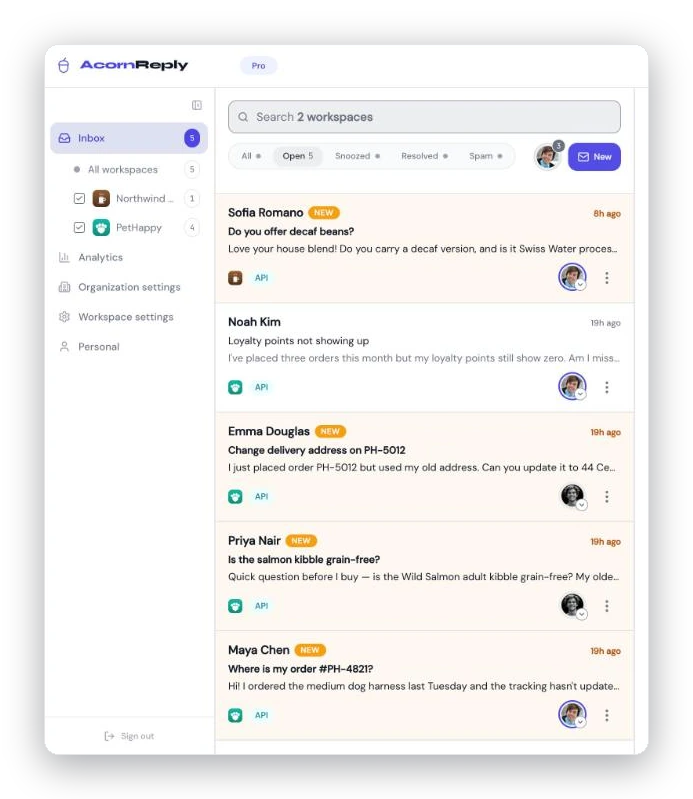
The workspace switcher in the sidebar: jump between inboxes, or pick "All workspaces" to see everything in one list.
One bill, no per-seat surprises
Because billing lives at the organization level and plans are a flat monthly price, adding workspaces and teammates doesn't multiply your bill. See Plans and what counts toward your limits.